Services & data products
The services, the order-service template, and the anatomy of a data product — its ports, its internal transformation, and the container image that ships it.
With the principles and the Kubernetes mapping in place, this page gets concrete: what the data products in this capstone actually are, the one service we build end-to-end as a template for the rest, and how a data product is packaged and shipped as a container image. This is the first implementation-heavy page — the conceptual scaffolding is behind us.
What a data product looks like here
A data product, in the abstract, is the architectural quantum of a data mesh: the smallest unit you can independently deploy and operate, carrying everything it needs to do its job. It has input ports (where data comes in), output ports (where it serves data out), the transformation logic between them, and the metadata and policies that make it discoverable and governed.
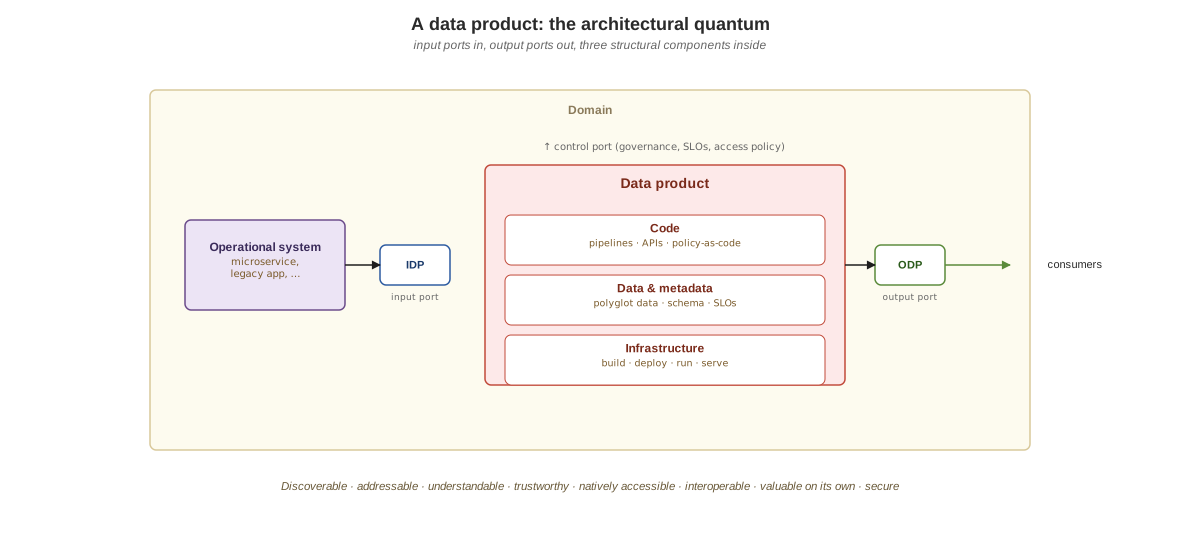
In this capstone, that abstraction is concrete: each domain service is a data product. It owns a slice of the database (its input/internal state), it serves data through its APIs (output ports), it emits events as other domains’ input, and it publishes a contract and metadata so it can be discovered and depended on. The service boundary and the data-product boundary are the same boundary — which is the cleanest way to make domain ownership real rather than aspirational.
The domain
The domain is order-placement-through-fulfillment, modeled deliberately small so the architecture stays legible. There are five domain services, each a bounded context owning its data and its contract, plus one gateway that composes reads across them (the gateway is a read-layer convenience, not a domain data product — six images in all). The five domains:
| Service | Domain | Owns | Talks via |
|---|---|---|---|
| order-service | Order lifecycle | the orders schema, the order state machine |
REST in from clients, gRPC out to inventory/payment/shipping, publishes orders.placed |
| inventory-service | Stock levels | the inventory schema |
gRPC server, publishes inventory.updated, consumes orders.placed |
| payment-service | Payments | the payments schema |
gRPC server, publishes payments.processed, consumes orders.placed |
| shipping-service | Shipments | the shipments schema |
gRPC server, publishes shipments.dispatched, consumes payments.processed |
| notification-service | Notifications | the notifications schema |
Kafka consumer only — reacts to events, emits notifications |
The variation is deliberate: not every service exposes every protocol. Each exposes the protocols that fit its role, not a uniform surface. notification-service is event-only because its job is to react, not to be called synchronously; the gateway exists to compose reads so clients don’t have to fan out across five services. The reasoning behind which protocol goes where is the subject of the data planes page; here the point is just that the surface follows the role.
Each service owns its own schema in a shared Postgres cluster — one schema per domain, so the database is partitioned by ownership even though it’s one managed cluster. That “one cluster, one schema per service” choice is what keeps per-domain data ownership real without running five separate databases on a single learning node.
Build one service end to end first
Rather than build all six services a layer at a time, the capstone takes a single service all the way through first — a walking skeleton. The point is to prove the entire spine works before widening: build the image, get it to the cluster, deploy via helm, have the operator-managed Postgres come up, the service connect, and data round-trip through a real API call. Once that path is verified on real hardware, the remaining services are mechanical repetition of the same pattern.
order-service is that template. It’s a Python service that owns the orders
schema. It starts speaking only REST, and gRPC, GraphQL, and event publishing get
layered on in later steps — but the deployment spine is proven first with the simplest
possible surface.
A couple of packaging choices carry across all six images. Dependencies are managed with a lockfile so builds are reproducible, and the lockfile is exported into the image rather than carrying the dependency manager into the runtime. The image itself is multi-stage: a builder stage resolves dependencies, and a slim runtime stage copies only the resolved environment and the application code, runs as a non-root user, and serves the app. Standard production hygiene — the capstone just applies it from the start rather than retrofitting it.
The one part that fights back: getting images to the kubelet
This is worth its own section because it’s the single part of the capstone that reliably trips people up. The profile is a Docker container (the docker driver) running containerd, and that container has its own image store, separate from the Docker Engine on your host. An image you build locally is invisible to the kubelet until you put it there, and a pod that can’t find its image fails in ways that look like a broken cluster.
The capstone’s answer is deliberately simple: build with Docker Engine, then load the
image into the profile with minikube image load. There is no registry to run and no
addresses to reconcile, and it works the same on a native engine and on a VM-based one
(Docker Desktop, for example). That portability is the reason for the choice:
pushing to a registry on the host’s loopback only works when the engine’s daemon shares
the host’s network, which a VM-based engine’s does not.
Images are tagged capstone/<svc>:v1 and the charts set imagePullPolicy: Never. The
policy matters in both directions. If an image was never loaded, the pod fails at once
with ErrImageNeverPull instead of quietly trying Docker Hub for a name that exists
nowhere. And because :v1 is a mutable tag, a rebuild does not change what running pods
use, so scripts/build-image.sh restarts the Deployments that use the image it just
loaded.
None of this is unique to the capstone — any local cluster has some version of the gap between the host’s images and the node’s — but the capstone is where it bites, because it’s the first place you build and deploy your own images at scale. Get the image workflow right once here, and every service afterward is the same three commands. (The deeper operational sharp edges of running all this on a single node are collected as gotchas, separate from this build-level friction.)
With a service shipped and running, the next question is how products describe themselves so others can find and trust them — contracts and the catalog.